



A pass tells the checkpoint which vehicle to let in and which not to. The allow list opens the barrier in Auto, the block list never lets a vehicle in and reports the passage. Passes are kept in the “Passes” tab of the checkpoint card, and every checkpoint has its own list: a pass opens only the checkpoint in whose list it was added.
The list of passes

- This checkpoint’s passes: plate, list, owner, validity
- Search by plate and owner
- Moving the list as a file: export and import CSV
- Add a pass
- The table holds this checkpoint’s passes. A pass of a neighbouring checkpoint does not work here and is not shown here.
- The search looks through plates and owners, the filter leaves one of the lists.
- A row shows the plate, the list, the owner, the direction, the validity period and how many times the pass has already been used.
- “Export CSV” and “Import CSV” move the whole list, for example from an old pass system or from another checkpoint.
One plate at several checkpoints
To let a vehicle through at two checkpoints, the plate is added to the list of each. These are two records: each has its own validity period, its own days and hours and its own counter of passages. So one vehicle can be let into the warehouse and kept out of the depot, and a courier can get ten passages at one checkpoint and none at another.
A whole list is moved with a file: press “Export CSV” in one checkpoint’s card and “Import CSV” in another’s. The export file lands on the new checkpoint together with the list, validity periods, days, hours and the limit; plates that are already there are skipped. A row whose period or hours cannot be read is not taken by the import and is counted as Not recognised rather than guessed: a guessed period would mean the gates open for the wrong vehicle.
A new pass
Press “+ Pass” and fill in the form.

| Field | What it sets |
|---|---|
| Number plate | The vehicle’s plate. It can be typed in Cyrillic or Latin letters; the plate is brought to one form by itself |
| List | Allow lets in, block keeps out |
| Owner and Phone | For the log and for security: who this is and how to get in touch |
| Direction | Entry and exit, entry only or exit only |
| Valid from and to | The validity period of the pass; an empty period means “with no end date” |
| Days of the week | On which days the pass works; nothing ticked means any day |
| Time from and to | The hours it works. The window can run past midnight: from 22:00 to 06:00 is a night shift |
| Use limit | How many times the pass can open; 0 means no limit. The counter grows only on a real opening, not in Observe |
| Pass is active | A pass that is turned off is kept but does not open |
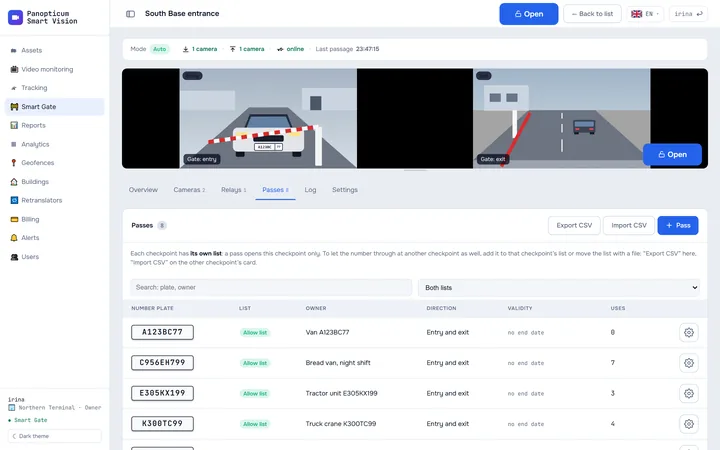
1In the checkpoint card, open the Passes tab and press “+ Pass”.
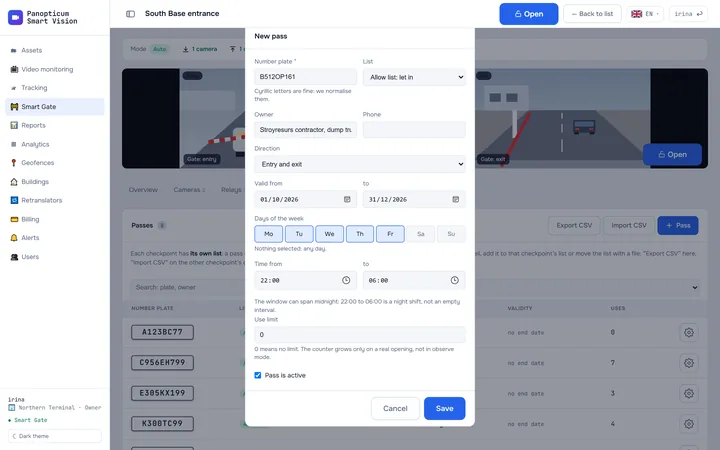
2Enter the number plate; Cyrillic letters are fine.
3Choose the list: the allow list lets the vehicle in, the block list keeps it out.
4Limit the days of the week if needed.
5And the hours. A window from 22:00 to 06:00 works at night, across midnight.
6Press “Save”.
How the lists work together
- The block list beats the allow list. If a plate is on both, the vehicle is not let in: otherwise it would be enough to get yourself a pass to escape the block list.
- An unreliably read plate neither opens nor gets marked as an offender: the checkpoint checks the recognition confidence first, then the lists.
- Similar characters. If “Allow one recognition error” is turned on in the checkpoint settings, the allow list forgives a mix-up of similar characters (0 and O, 8 and B) or one extra or missing character. The block list is compared only exactly.
- The window and days are checked against the account’s time zone.
The full order of checks is shown in Smart Gate.
In the apps
Web
Everything described above.
Windows
The checkpoint’s passes in a tab of its card: the list and the form with the same fields. Exporting and importing the list as a file is available only in the web app.
Android
Passes in the checkpoint card: the list and the pass form.
Telegram
In the Telegram panel, passes open from the checkpoint card.
If it did not work
- A vehicle with a pass did not get through. Check the reason in the log: “Plate is not on the list” happens when the pass is not valid right now (period, days, hours, direction or limit), while “Plate read unreliably” means the camera is to blame, not the pass.
- The pass is not visible in the list. It was added at another checkpoint: every checkpoint has its own list. Open that checkpoint’s card or add the plate to this one’s list.
See also
Found a mistake, or didn’t find an answer? Write to us on Telegram or send us a request, and we will reply and fix the article.