



Buildings and floor plans with cameras
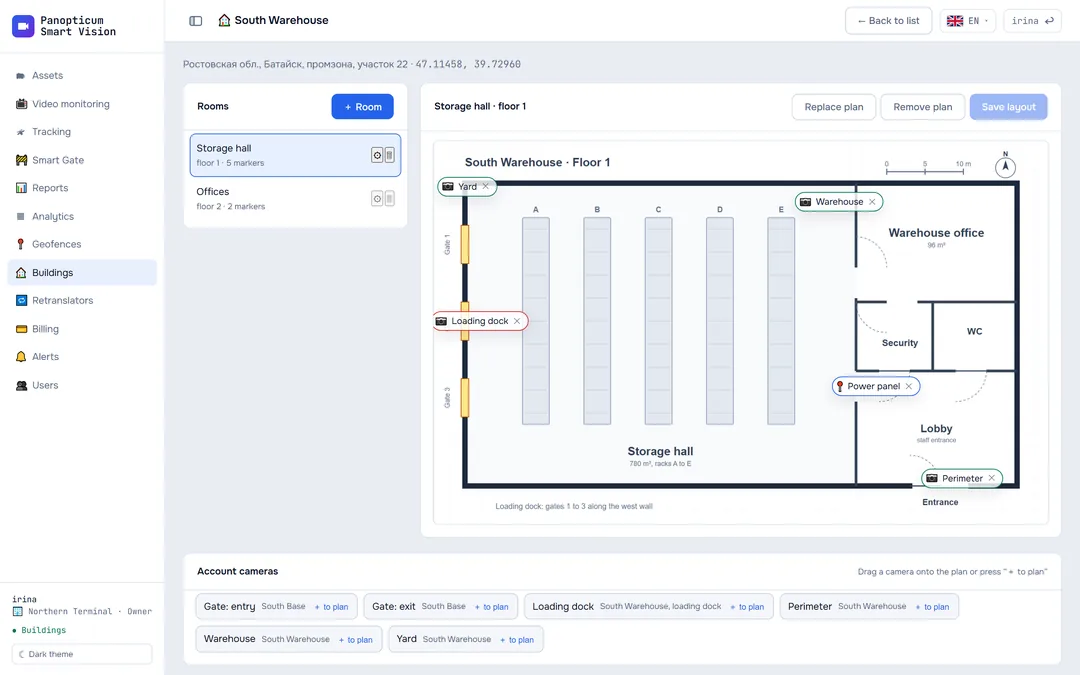
Add addresses, upload floor plans and place cameras right on the plan. The operator sees where each camera is and opens the video from its mark on the plan.
Features
Addresses
Suggestions as you type, a point on the map, geolocation.
Floor plans
A plan image for every room.
Cameras on the plan
Drag a camera from the list straight onto the plan.
Video from a mark
Clicking a mark opens the live video.
Buildings in reports
The report shows the building name instead of coordinates.
In Telegram too
Buildings and plans open in the Mini App.
Frequently asked questions
Is a postal address required?
Works together with
Video monitoring
A video wall of IP cameras in the browser with no plug-ins, PTZ control, and a check of every camera every 30 seconds.
Learn moreAssets
A whole vehicle or site: map, live video, a timeline of moving and parking, all the equipment.
Learn moreReports
13 tables and 7 charts: trips, parking, engine hours, violations, geofences. CSV export and printing to PDF.
Learn moreWe will show it on your equipment
Tell us about your task, and we will show Panopticum on your cameras and vehicles
Or start on your own: after sign-up you get 14 days of the “Business” plan free, no card needed.
- We reply during working hours, fastest on Telegram
- We will help you connect cameras and devices remotely
- Only you and your staff see your data
Request sent
We will reply during working hours. If it is urgent, message us on Telegram.