



GPS and GLONASS tracking with in-cab video
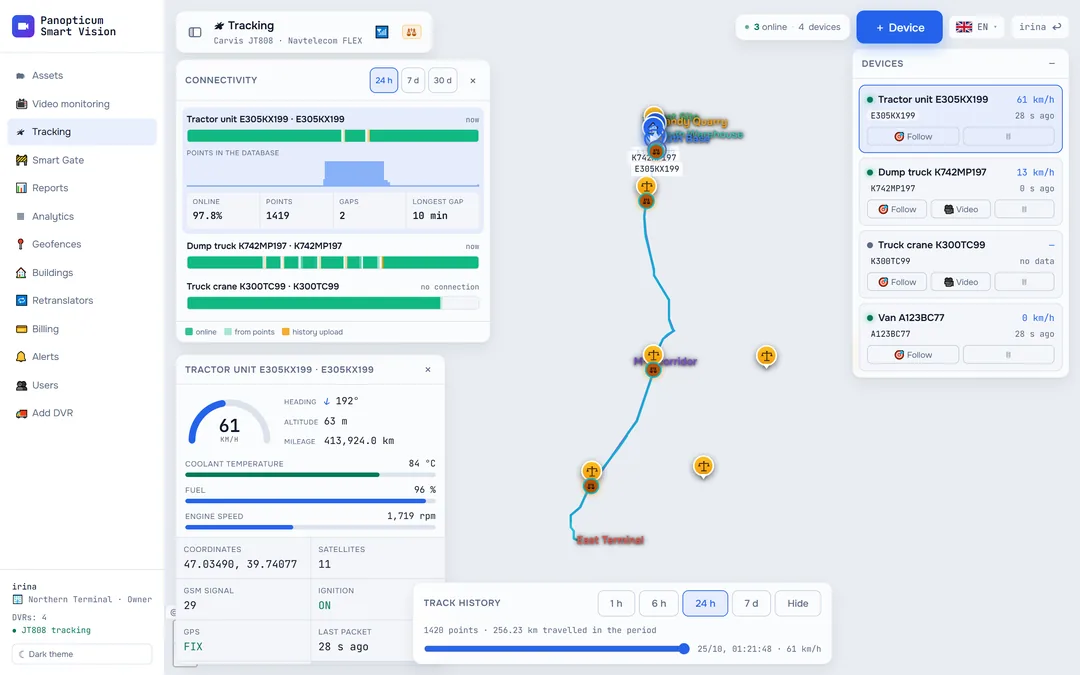
Vehicles on the map in real time, tracks for any period and video from Carvis DVRs with up to four channels. Navtelecom devices and trackers using the Wialon IPS protocol connect the same way.
Features
Carvis JT808
DVRs with video: up to four channels per vehicle.
Navtelecom FLEX
Full device telemetry: voltage, sensors, CAN.
Wialon IPS
Trackers using this protocol connect without any changes.
Black box at its own time
Points stored without a connection land at the device’s time, not at the moment of delivery.
WIM station layer
Weigh-in-motion gantries on the same map.
Geofences on the map
Entries and exits show right where the vehicle is.
Where the vehicle was and what happened to it
Track, parking, geofences and WIM gantries on one map. If a vehicle was out of contact for a while, the device sends the stored points later, and they land at their real time: the trip does not collapse into a single line.
Four vehicle cameras in one window
DVR video starts at the press of a button: the vehicle’s channel is busy only while you watch. Buttons switch between channels, each with its own camera.
 Channel 1 roadLIVE
 Channel 2 cargo bayLIVE
 Channel 3 reversingLIVE
 Channel 4 right sideLIVE
The frames in this illustration are drawn. DVR video is live and only streams while someone is watching.
Scale
One server takes about two thousand DVRs and trackers. Points without a satellite fix are not written to the history: the device just repeats its last known position.
Specifications
| Input | JT808 and JT1078 (Carvis), FLEX (Navtelecom), Wialon IPS |
|---|---|
| Video | up to 4 channels per DVR, H.264 and H.265 |
| Forwarding | EGTS, EGTS OID, Wialon IPS |
| Map refresh | every 2 seconds |
Frequently asked questions
Which devices are supported?
How do I connect a device?
Does DVR video stream all the time?
Works together with
Assets
A whole vehicle or site: map, live video, a timeline of moving and parking, all the equipment.
Learn moreGeofences
Polygon, corridor or circle. Entry, exit, speed, long stay and absence.
Learn moreRetranslators
Data forwarding to Rostransnadzor and regional systems over EGTS and Wialon IPS, with resending of past periods.
Learn moreWe will show it on your equipment
Tell us about your task, and we will show Panopticum on your cameras and vehicles
Or start on your own: after sign-up you get 14 days of the “Business” plan free, no card needed.
- We reply during working hours, fastest on Telegram
- We will help you connect cameras and devices remotely
- Only you and your staff see your data
Request sent
We will reply during working hours. If it is urgent, message us on Telegram.