


Assets: a whole vehicle or site
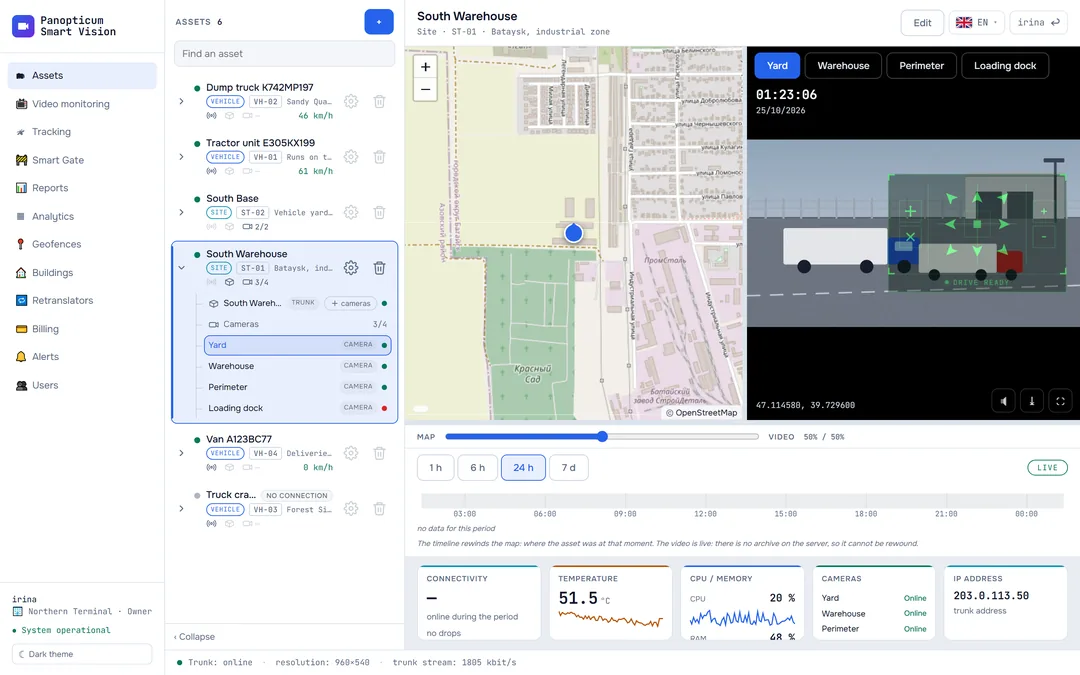
Pick an asset and one screen shows the map with its track, live video from its cameras, the timeline and all the equipment linked to it.

Features
Map and video side by side
Drag the divider between them: more map or more video, as you prefer.
Timeline
Moving, stopped, parked, no position data and connection lost on one strip.
Map rewind
Click the timeline to see where the asset was at that moment.
Event marks
Geofence entries and exits show right on the timeline.
All the equipment
The asset’s DVR, tracker, trunk and cameras in one tree.
Vehicles and sites
An asset can be a vehicle, a site or a single point with a camera.
Moving, parking and connectivity on one strip
Below the map runs a timeline for the chosen period: 1 hour, 6 hours, a day or a week. The colour of each segment tells you at once whether the vehicle was driving, standing with the engine running or switched off. Clicking the timeline moves the map to that moment.
An overnight stop does not look like a failure
A vehicle with the engine off sends a presence signal without coordinates. Panopticum works out connectivity and position from different data, so parking stays parking, and connection loss is marked only when the device really went silent.
A site: cameras, buildings and checkpoints together
For a fixed asset, the point is placed on the map by address, and cameras, a trunk and a Smart Gate checkpoint are linked to it. The operator opens the site and sees everything at once.
Works with
Frequently asked questions
Can I watch video from a past period?
What if no equipment is linked to the asset yet?
How many assets can I create?
Works together with
Tracking
GPS and GLONASS on the map. Carvis DVRs with up to 4 video channels, Navtelecom FLEX, Wialon IPS.
Learn moreVideo monitoring
A video wall of IP cameras in the browser with no plug-ins, PTZ control, and a check of every camera every 30 seconds.
Learn moreReports
13 tables and 7 charts: trips, parking, engine hours, violations, geofences. CSV export and printing to PDF.
Learn moreWe will show it on your equipment
Tell us about your task, and we will show Panopticum on your cameras and vehicles
Or start on your own: after sign-up you get 14 days of the “Business” plan free, no card needed.
- We reply during working hours, fastest on Telegram
- We will help you connect cameras and devices remotely
- Only you and your staff see your data
Request sent
We will reply during working hours. If it is urgent, message us on Telegram.