



Trunk: video from a site without a public IP
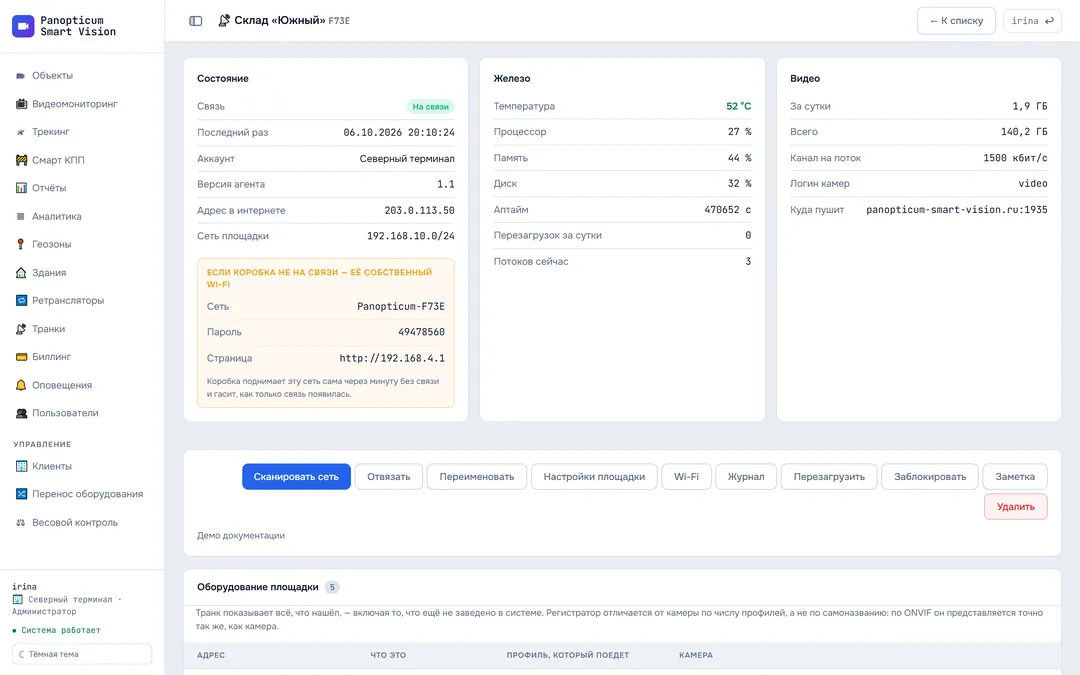
A small box or HDMI stick running Panopticum OS. Plug it into the site network, and within a few minutes the cameras are visible in the browser. It works behind a 4G modem, CGNAT and any router.
This section’s interface is in Russian for now.
Click any node in the diagram to see what it does.
Features
Finds cameras via ONVIF
It asks each camera for its stream address.
Outgoing connection
No public IP or port forwarding needed.
The server never connects to the site
Every 30 seconds the trunk checks in and gets its commands in the reply.
Over-the-air updates
With rollback if something goes wrong.
Installs in 3 to 5 minutes
From a ready-made drive or with a single command.
Stream watchdog
A frozen stream restarts on its own, with no site visit.
Installation
From box to video in your browser in a few minutes
Connect it
A cable into the site’s router, or Wi-Fi through the box’s set-up hotspot.
Site key
We issue the key when you connect. With it, the box contacts the server by itself.
Cameras are found
The trunk scans the network and asks the cameras for their stream addresses over ONVIF.
Video on the wall
The selected cameras appear in your video wall like any others.
Or onto your own computer with one command
Any machine on site running Debian or Ubuntu will do. Partitions, the bootloader and data are not touched.
curl -fsSL https://panopticum-smart-vision.ru/trunk.sh | sudo bash -s -- KEY
- Over-the-air agent updates, with rollback on failure
- A stuck stream restarts by itself, with no site visit
- Streams come back by themselves after a reboot
- Camera audio if the site owner wants it
Frequently asked questions
What is needed on site?
Can I install it on my own computer?
What happens after the box restarts?
Works together with
Video monitoring
A video wall of IP cameras in the browser with no plug-ins, PTZ control, and a check of every camera every 30 seconds.
Learn moreSLA analytics
Availability of each camera as a percentage: which ones went down, when and for how long.
Learn moreBuildings
Addresses and floor plans, with cameras placed right on the plan.
Learn moreWe will show it on your equipment
Tell us about your task, and we will show Panopticum on your cameras and vehicles
Or start on your own: after sign-up you get 14 days of the “Business” plan free, no card needed.
- We reply during working hours, fastest on Telegram
- We will help you connect cameras and devices remotely
- Only you and your staff see your data
Request sent
We will reply during working hours. If it is urgent, message us on Telegram.