



Section “Apps”
All documentation sectionsThe Telegram panel is the Panopticum web app inside the messenger: assets, video, the map, Smart Gate checkpoints, reports and the other working sections. It needs no installation: it opens from the chat with the @PanopticumAlertBot bot on any phone or computer with Telegram, including an iPhone.
The panel is in English or Russian; the bot’s messages and its menu button are in Russian for now.
How to open it
- Open the chat with the @PanopticumAlertBot bot and press the menu button next to the input field (its label is in Russian), or send the /app command.
- On the first visit the panel asks for a username and password: the same as in the web app. This links your Telegram to your user account, and from then on the panel recognises you by itself, without a password.
- The Assets section opens.
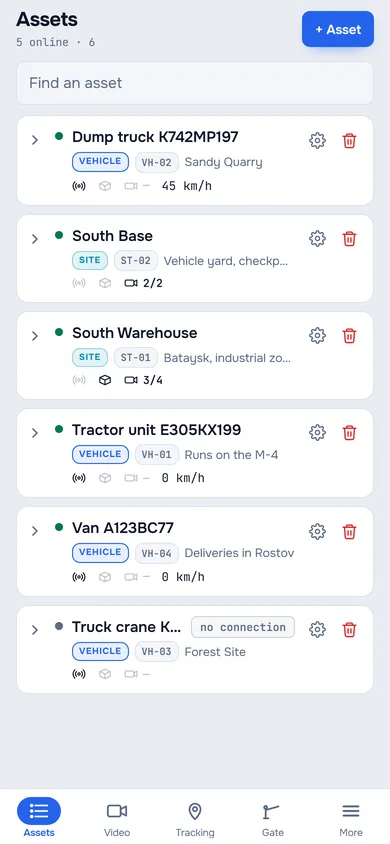
1In the chat with the bot, press the panel button to the left of the message field, or send the /app command. The first time, the panel asks for your web app username and password.
2The panel opens on Assets.
3The web app’s sections are at the bottom.
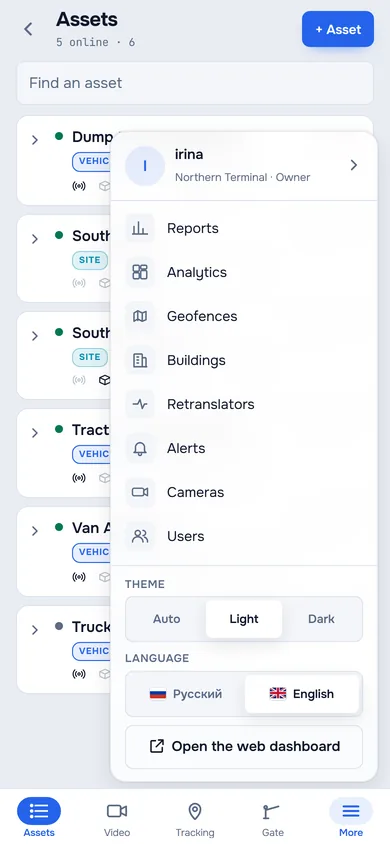
4The “more” button opens the other sections and the theme choice.
The bottom menu and More

- An asset: a tap opens its card
- The asset’s equipment
- The bottom menu: sections
- More: the other sections and the theme
At the bottom are the same sections as in the left menu of the web app: Assets, Video, Tracking, Gate. How many items fit depends on the width of the window: four and More on a phone, more in the Telegram window on a computer. The other sections and the theme open with the More button.

- The other sections
- Theme: auto, light or dark
- Theme: Auto follows Telegram’s theme; Light and Dark set it explicitly. Your choice travels between your devices with Telegram.
- Language: Russian or English. On your first sign-in the panel takes your Telegram’s language, and your choice is remembered in your user account. The bot’s messages and its menu button are in Russian for now.
- The row with your username opens the account screen: your role, the version and the Sign out button, which unlinks Telegram from your user account.
- Open the web dashboard opens the full web app in the browser.
Assets
The asset list works as in the web app: connection state, type, code, the equipment counter, and the arrow expands the tree. A tap on an asset opens its card: the map with the track, video, readings and the timeline.

- Video: DVR channels and cameras
- Under the video are the source buttons: the asset’s cameras and the channels of a Carvis DVR. If the DVR is offline, its channels are greyed out.
- The timeline moves the vehicle on the map to the chosen moment; to come back to the present, press LIVE next to the timeline caption.
- The owner and operators edit an asset with the pencil in the card header.
More in Assets.
Video
A video wall where you choose how many tiles there are in a row: one, two or three. Only the tiles visible on the screen play: cameras beyond the edge of the screen do not use mobile data. A tap on a tile opens the camera full screen; a PTZ camera has its control under the picture.

- How many tiles in a row
Tracking
The map with the account’s devices; the Devices button opens a list that shows who is online and opens a device’s track for a period.

Other sections
Under More are reports, analytics, geofences, buildings, retranslators, alerts, the camera list and, for the owner, users. They work with the same data and permissions as in the web app. There is no Billing section in Telegram: invoices and payment are in the web app and the other apps.
If it does not work
- It says the username or password is wrong. Enter your web app username and password. After ten sign-in attempts within an hour, signing in is closed until the start of the next hour.
- The panel opened under someone else’s username. Open More, then the row with the username, and press Sign out; then sign in with your own.
- Video does not load. Telegram shows the same video as the web app: see Video monitoring.
See also
Found a mistake, or didn’t find an answer? Write to us on Telegram or send us a request, and we will reply and fix the article.